App Info
Rating
Everyone
Release
Apr 5, 2015
Last Update
- Android 11 requires special permissions to access system files which is not allowed, please use load/save using external file browsing apps you have installed on your device.<br>- [Added] New Spot icons<br>- [Added] Transparent label background<br>- [Fixed] Login issues <br>- [Added] PDF Preview page<br>- [Added] Edit distances, altitude, angle and azimuth
Genre
Maps & Navigation
About
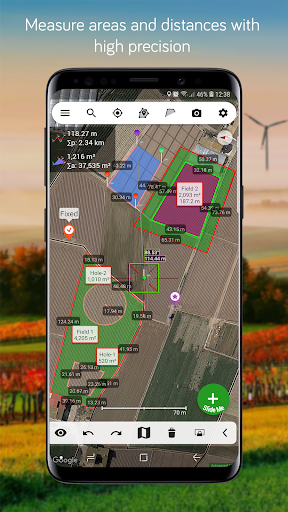
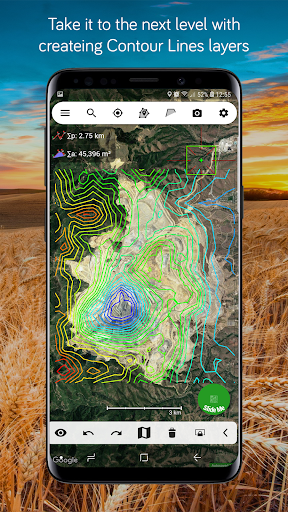
Agro Measure Map Pro lets you quickly and easily measure multiple distances, perimeters and areas with laser sharp precision! It even takes into account the curvature of the earth’s surface. Use it for small areas or large, then share your findings via any sharing app you have on your device. Calculate surface areas, buildings, plots, floors, forest areas or dimensions for fencing, sports tours, trips or anything you need for field work without having to go to the spot to take measurements. Only one finger to calculate with astonishing accuracy all these measurements over satellite images. That’s what Agro Measure Map Pro is for, to put a powerful, portable measuring tool right in the palm of your hand. Your Android device can now provide you with totally precise measurements of any distance, from as small as one tenth of a meter to as big as thousands of kilometers or miles, even taking the curvature of the earth’s surface into account when measuring. It does all that, fast and effortlessly. Just one "Magic" button for all the operations to easily place points without losing it's professional accuracy. Differences between Agro and the Pro version: - Create buffers around polygons with round, square and mitre corner styles. - Split a polygon by two points. - Create Contour Lines. - Create Grid area inside any polygon. Check out the impressive features you get in Agro Measure Map Pro: * Create unlimited polygons with unlimited pins. * Draw shapes: Circles and Rectangles. * Elevation Profile of a route * Attractive, smooth, easy navigation and use * Extra Maps: Get the extra map sources package with an in-app-purchase. * Displays Maps View: Map, Satellite, Hybrid and Terrain. * 3D Buildings * Geodesic Segments * Operations: Add, delete intermediate pins, insert between pins, move pins, get info. * Multiple areas and routes on screen * Display of altitude above sea level, azimuth and angle * Undo and redo operations as needed * Sharing exported files to any sharing app on your device. * Calculates azimuth or bearing * Search for current location, text (villages, places of interest, etc.) or an area or route * Length units: meters, kilometers, feet, yards, miles, nautical miles, ken, ri, bù, lǐ, link, chain. * Surface units: square meters and kilometers, ares, hectares, square foot, square yards, square miles, acres, fanegas (Valencian, Castilian or Colombian), tsubo, bu, so, lí, mǔ * Intermediate distances between pins can be displayed * Ability to select color and thickness of the perimeter line. * Ability to select the color and transparency of the selected area. * Working format: Measure Map, KMZ, KML, CSV ,GPX, Image (PNG) and PDF * Export and import of surfaces and routes via any storage account linked to your device. * Save to photo album Differences with the non-pro version: * Create unlimited pins and polygons. * Calculates multiple areas and routes simultaneously. * Extra Maps. * Ability to create inner polygons as "holes". * Drawing of shapes: circle and rectangle. * Calculates azimuth or bearing. * Displays altitude above sea level, azimuth and angle. * Imports KML, KMZ and GPX format files besides exporting them. * Track mode: drops pins on current GPS position at regular intervals. * Snap to Point feature. * Duplicate Polygons. * Display Elevation Profile along a path. * Future improvements will be incorporated to the professional version. If precise measurements are important to you, this is the app you need. You won’t find one that is better, more accurate and easier to use.
Gallery



Contacts
http://www.measuremapapp.com/
Reviews
A Google user
very good app
A Google user
Excellent
Gangadhar Jangam Royalty Inspector
It helped a lot in my field work. We can measure the area, Distance accurately. Furthermore, we can mark the locations and area in maps.
Adil Jamal
It is the most precise and feature-rich app of its kind, a conclusion after trying many similar apps! It's sad that it hasn't been updated for a long time (perhaps no bugs found?). A dark theme and layer feature are strongly requested. Thank you developers!
A Google user
Great mapping and very easy to use
Struan Garland
Fantastic measuring app with many useful applications.
Bryan Anderson
cool
A Google user
This version not work with Pixel 3, i try with every mesuremap already
A Google user
Purchased this paid version @ 5100 from Google play store , very poor app , delist from app store . I tried to load a . kml file after that this app stopped functioning , tried multiple installation and uninstallation but no improvement . Paid 5100 for this app but zero satisfaction , very poor performance , even after feedback no improvement
Phil Bolduc
best ever
A Google user
I have used this app for a couple years now and although there have been small issues with it's operation, it generally works as expected. The developers are quick to respond and release regular updates and improvements. This technology is constantly changing and this app does a good job keeping pace. Ive found many issues are device or location related and not a fault of the app. Highly recommended!